Template: Create an MOC Note with a Link Dashboard
Use this pattern when you want QuickAdd to create a new map-of-content note that already contains a live Base dashboard for both backlinks and outgoing links.
Why this pattern
Section titled “Why this pattern”A Template choice can create the note and insert the dashboard in one step.
The note stays markdown, while the embedded .base block gives you a live view
of how that note connects to the rest of your vault.
This works well for maps of knowledge, hub notes, topic notes, and evergreen indexes.
Imported the package above? Run New MOC note from the command palette and enter a title, then skip to What you get.
- Create a reusable
.basetemplate, for exampleTemplates/MOC Link Dashboard.base:
formulas: note_link: "file.asLink()"properties: formula.note_link: displayName: Note file.folder: displayName: Folder file.mtime: displayName: Updatedviews: - type: table name: Backlinks filters: and: - 'file.ext == "md"' - "file.hasLink(this.file)" - "file.path != this.file.path" order: - formula.note_link - file.folder - file.mtime - type: table name: Outgoing links filters: and: - 'file.ext == "md"' - "this.file.hasLink(file)" - "file.path != this.file.path" order: - formula.note_link - file.folder - file.mtime- Create a markdown template, for example
Templates/MOC Link Dashboard.md:
---tags:  - moc---
# {{VALUE:moc_title}}
## Link Dashboard
Use the view picker in this embedded base to switch between backlinks andoutgoing links for this note.
```base{{TEMPLATE:Templates/MOC Link Dashboard.base}}```
## Notes
- Start linking this note to related ideas.- Create a Template choice (see the Template choice docs) with settings like these:
- Template Path:
Templates/MOC Link Dashboard.md - File name:
{{VALUE:moc_title}}(before QuickAdd 2.30.0, this is File name format; turn its toggle on first) - Create in folder: your MOC folder, for example
MOCs - Open: enabled
- If the target file already exists:
Create another file - New file naming:
Increment trailing number
- Run the Template choice and enter a title such as
Alpha Project.
What you get
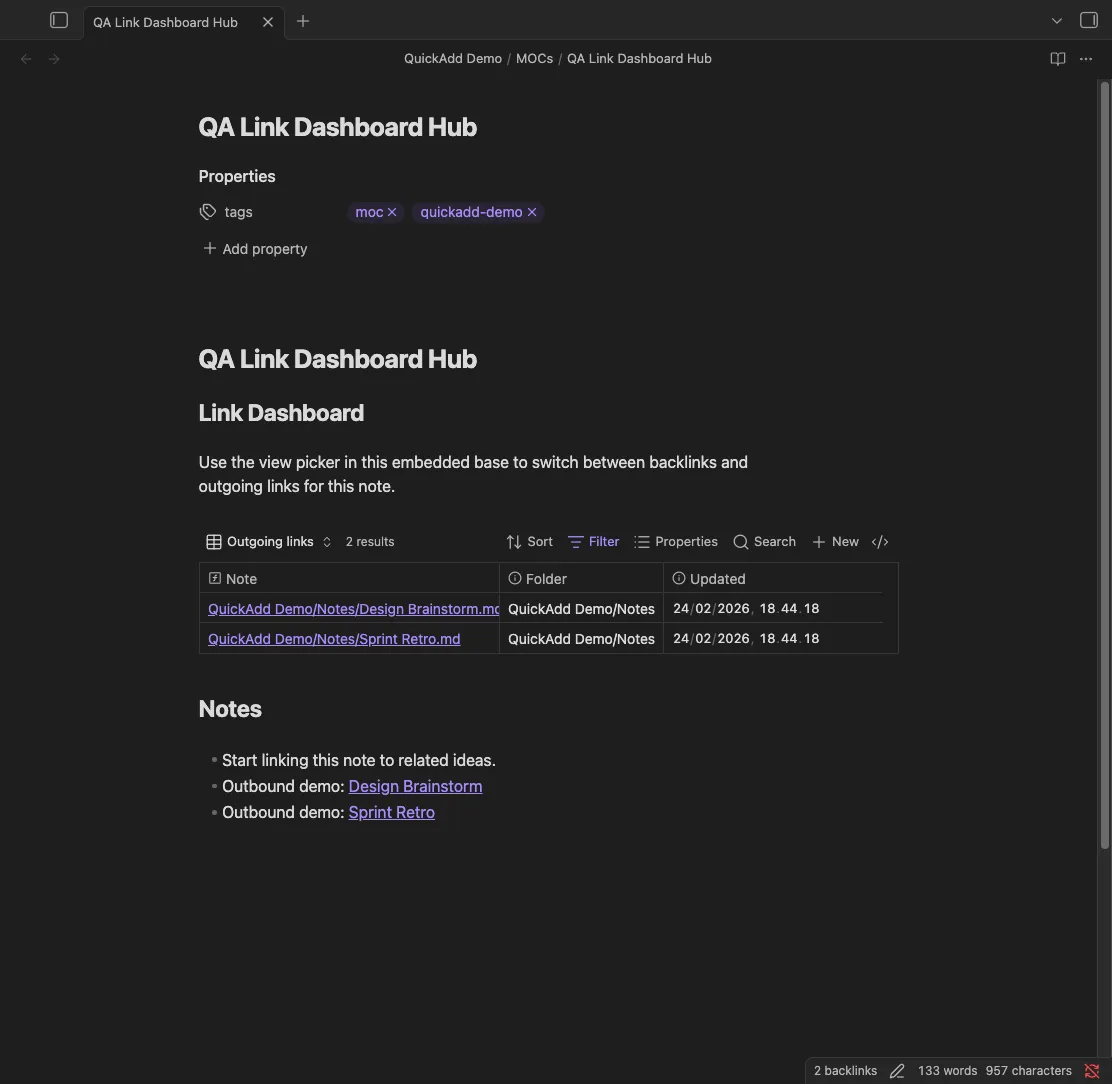
Section titled “What you get”QuickAdd creates a new markdown note with an embedded Base block. Inside the note:
Backlinksshows notes that link to the new MOC.Outgoing linksshows notes the MOC links to.- Both views use
this.file, so the dashboard automatically scopes itself to the note that was just created.
After the note exists, add links in either direction and the dashboard updates with the current graph around that note.